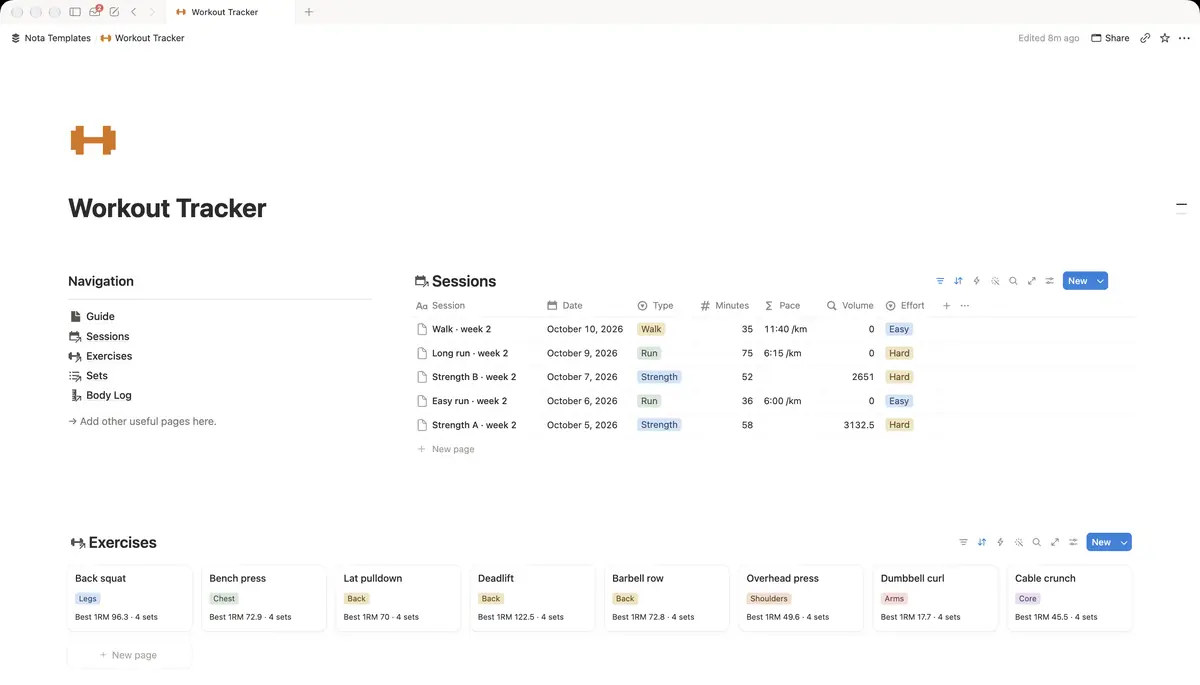
Sessions: one row per workout
Create a database called Sessions and rename Name to Session. Add these properties:
- Date: Date.
- Type: a Select: Strength, Run, Walk, Cycle, Swim, Rest.
- Minutes: Number.
- Distance: Number, for runs, rides and walks. Leave it empty for strength days.
- Effort: a Select: Easy, Moderate, Hard.
- Note: Text. One line on how it went.
Log rest days too, with Type set to Rest. A planned rest day is part of training, and an empty week in the log is easier to read when you can see which days were deliberate.
Exercises: your movement library
Create a database called Exercises with Exercise as the title, a Muscle group select (Chest, Back, Legs, Shoulders, Arms, Core, Full body) and an Equipment select (Barbell, Dumbbell, Machine, Bodyweight, Cable). Add the exercises you actually do, usually ten to fifteen.
Sets: where the numbers go
Create a database called Sets. Name each row after the exercise and set number, such as "Squat 1". Add a Session relation pointing at Sessions, an Exercise relation pointing at Exercises, and two numbers: Weight and Reps. Then add a formula called Volume:
prop("Weight") * prop("Reps")What it does: multiplies weight by reps, so 60 kg for 8 reps is 480. Volume is the simplest way to see whether a session was bigger than the last one.
Open a session page and add a linked view of Sets filtered to that session. You then log every set from inside the session, and the Session relation fills itself in.
Estimated one-rep max
You rarely test a true one-rep max, but you can estimate it from any set. Add a formula called Est 1RM on Sets:
round(prop("Weight") * (1 + prop("Reps") / 30) * 10) / 10What it does: uses the Epley formula to estimate the most you could lift once, based on the weight and reps of that set, rounded to one decimal. 60 kg for 8 reps gives 76.
The estimate is most accurate for sets of 10 reps or fewer. Treat it as a trend line, not a target for your next session.
Personal bests per exercise
Go to Exercises and add two rollups through the relation from Sets:
- Best 1RM: Relation Sets, Property Est 1RM, Calculate Max.
- Sets logged: Relation Sets, Property Set, Calculate Count all.
Sort Exercises by Best 1RM, or open one exercise to see every set you have ever done on it. When Best 1RM goes up, that is a personal best, without a separate PB table.
Totals per session
Back in Sessions, add a rollup called Volume: Relation Sets, Property Volume, Calculate Sum. Now each strength session shows its total volume next to its minutes and effort.
Views for the week and the month
Add a few views on Sessions:
- This week: filtered where Date is within this week. Set the Minutes column calculation to Sum.
- Calendar: a Calendar view by Date, so gaps and streaks show at a glance.
- Runs: filtered where Type is Run, with Distance summed at the bottom.
Link training to a goal
If you are training for something, such as a 10K or a first pull-up, create a Goals database and add a Supports relation from Sessions to Goals. On Goals, add a rollup called Minutes trained: Relation Sessions, Property Minutes, Calculate Sum.
Minutes trained per goal answers the honest question: how much time did this goal actually get this month?
Logging at the gym
Open the session page on your phone before the first set and fill in each set right after it. The Notion app works offline for pages you have open, and syncs when you are back online. If typing between sets is too slow, log the top set of each exercise only. That is enough for the numbers above to work.