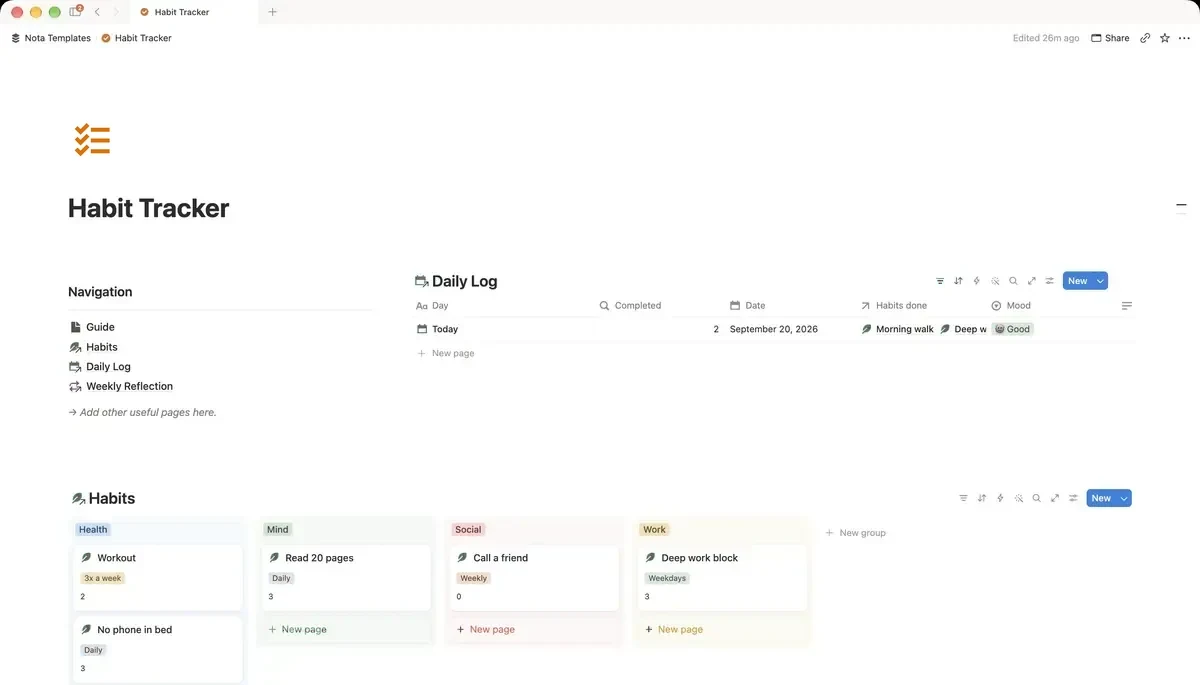
What you are building
Two databases. The first, Habits, holds one row per habit — six rows, not sixty. The second, Daily Log, holds one row per day, and each day points back at the habits you actually did. Because the habits live in their own table, adding a day never widens anything, and dropping a habit in March does not destroy the history from January.
Step 1 — Create the Habits database
On a blank page type /table and choose Table view, then pick New database. Name it Habits. Rename the Name column to Habit, then add these properties:
- Frequency — a Select with Daily, Weekdays, 3x a week, Weekly.
- Category — a Select with whatever areas you care about: Health, Mind, Work, Home.
- Active — a Checkbox. This is how you retire a habit without deleting it.
- Minimum version — Text. Write the version you would still do on your worst day: "ten minutes round the block", not "5km run".
Add three to five habits. Not fifteen. The most common failure is starting with a list nobody could finish on a good day, let alone a bad one.
Step 2 — Create the Daily Log
Below it, make a second database called Daily Log. Rename the Name column to Day. Then add:
- Date — a Date property.
- Habits done — a Relation pointing at your Habits database.
- Mood — a Select. Four options is plenty.
- Sleep — a Number.
- Note — Text, for the one line that explains an odd day.
When Notion asks whether to show the relation on both sides, say yes. You will need the other side in the next step.
Step 3 — Count the habits you did each day
Open Daily Log, add a property, and choose Rollup. Set Relation to Habits done, Property to Habit, and Calculate to Count all. Name it Completed. Every day row now carries a number, and that number is what makes the whole thing readable at a glance.
Step 4 — Count each habit's all-time total
Now the other direction. Open the Habits database, add a Rollup, set Relation to Daily Log, Property to Day, and Calculate to Count all. Name it Times done. This is the column that tells you the truth six weeks in: which habits you are actually doing, and which one you have been telling yourself you do.
Step 5 — See the gaps, not just the wins
In Daily Log, add a view and choose Calendar, with Show calendar by set to Date. A streak is easy to see in a calendar and almost invisible in a table — and so is a gap, which matters more. A week of blank squares is information; a missing row in a table is nothing.
In the table view, sort Date descending so today is at the top. You will open this every day; do not make yourself scroll.
Step 6 — One weekly review (optional, and the part that works)
Add a third small database, Weekly Reflection, with a Date and three Text properties: What worked, What didn't, One change. Fill it once a week. The tracking itself changes very little. Noticing that you skipped reading every night you went to bed late is what changes something.
Three mistakes worth avoiding
A column per day — the table grows forever and becomes unopenable. Too many habits at once — three you keep beats ten you abandon. And deleting a habit you stopped doing, which erases its history; uncheck Active instead, and the Times done rollup keeps the record.