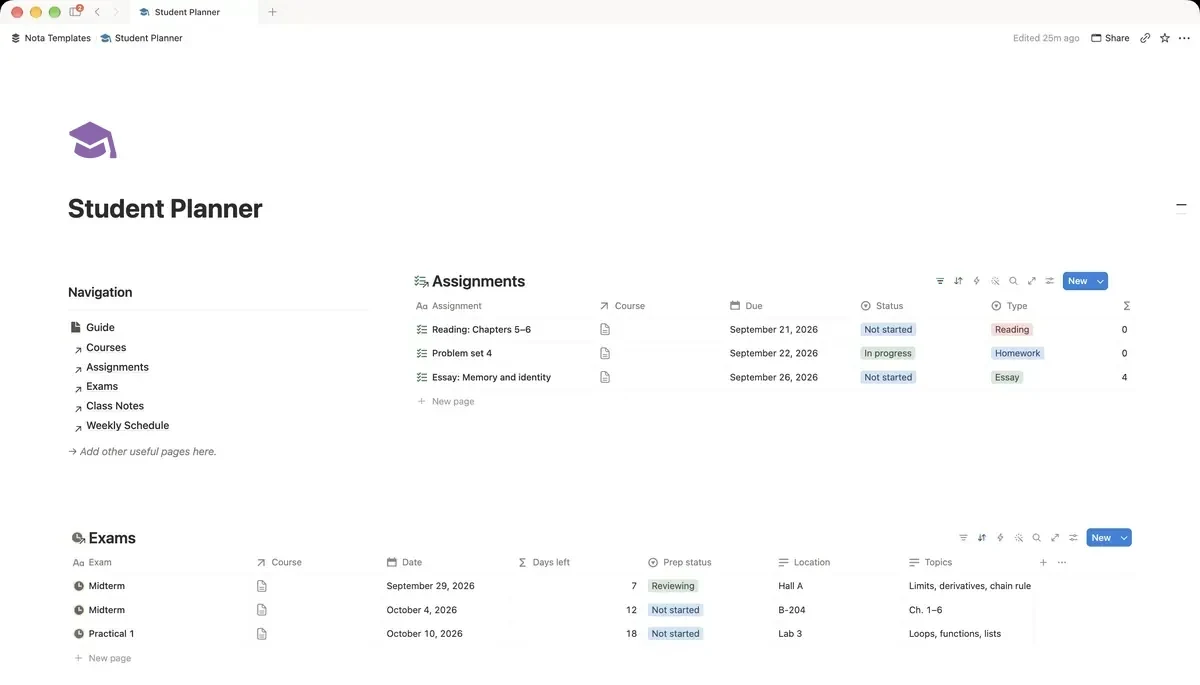
One page per semester
Create a page called Fall 2026 (or whatever your term is called) and build everything inside it. When the semester ends, you duplicate the page, clear the rows and rename it. The structure carries over, last term's work stays readable, and nothing from an old module clutters the new one.
Courses: the page everything links to
Type /table, choose New database and name it Courses. Rename Name to Course, then add these properties:
- Code: Text, the short code from your timetable (MATH140).
- Instructor: Text.
- Credits: Number.
- Room: Text.
- Current grade: Number. You type this in when a mark comes back.
Only real courses go here. A club or a part-time job has no assignments and no grades, and it will make every count below wrong.
Assignments: write every deadline down the day you hear it
Create a second database called Assignments. Rename Name to Assignment and add a Course relation pointing at Courses, a Due date, a Status select (Not started, In progress, Submitted, Graded), a Type select (Homework, Essay, Project, Quiz, Reading), a Weight % number and a Grade number. Then add a formula property called Days left:
if(empty(prop("Due")), "", format(dateBetween(prop("Due"), now(), "days")))What it does: shows how many days remain until the due date, and stays blank if there is no date yet.
Copy the weight of each assignment from the course outline in the first week. It is the number that tells you whether an evening is better spent on the essay or on the quiz.
Exams: a countdown and a prep status
A third database, Exams, with a Course relation, a Date, Location and Topics as text, and a Prep status select: Not started, Reviewing, Ready. Add a Days left formula:
dateBetween(prop("Date"), now(), "days")What it does: counts the days from today to the exam.
Sort the table by Date, oldest first. The exam at the top is the next one, and its prep status tells you honestly whether you have started.
Class notes that stay with the course
Create Class Notes with a Course relation, a Date, a Topic as text, Tags (Lecture, Lab, Tutorial, Important) and a Reviewed checkbox. Write each lecture's notes inside its own row: open the row and type on the page. Then add a view called To review, filtered to Reviewed unchecked.
The Reviewed box is the useful part. Notes you never read again do not help in the exam. Clearing the To review list once a week does.
Your week on one screen
Two views do most of the work:
- In Assignments, add a view called Due this week: filter Due is within the next week and Status is not Submitted or Graded. Sort by Weight % from high to low.
- Add a small Weekly Schedule database: one row per class, a Day select (Mon to Fri), the time as text, a Course relation and a Room. Show it as a board grouped by Day.
- Back in Courses, add a rollup called Open assignments that counts the Assignments linked to each course.
Put the Due this week view and the next exam at the top of your semester page as linked views. That page is the one you open every day.
A 10-minute Sunday routine
The setup only works if it stays current. Once a week:
- Add any new assignment or exam from your inbox, course site or class chat.
- Update Status on what you finished and enter grades that came back.
- Tick Reviewed on the notes you went over.
- Read the Due this week view and pick the heaviest item to start on Monday.
What not to put in Notion
Leave lecture slides and PDFs where your course keeps them and paste the link into the course page. Do not rebuild your timetable as repeating calendar events either: the university's app already does that and keeps it up to date. Notion is for the parts that change every week: deadlines, grades and your own notes.