The one thing to accept first
Notion does not connect to your bank. Every transaction is typed in, or merged in from a CSV your bank exports. That sounds like a flaw and is mostly the point: a purchase you had to type is a purchase you noticed. Keep entry to under a minute a day and it holds.
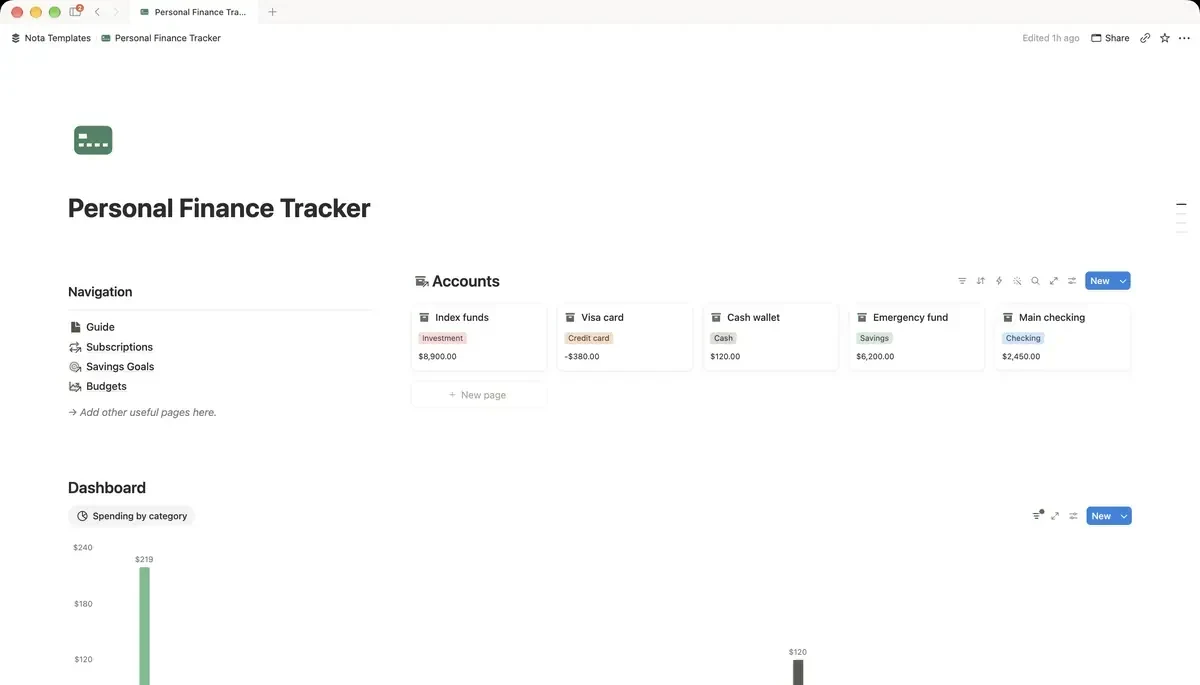
Database 1: Accounts
Name it Accounts, rename the Name column to Account, then add a Type select (Checking, Savings, Cash, Credit card, Investment) and a Balance number formatted in your currency. Four or five rows: wherever money actually lives.
Database 2: Budgets, one row per category per month
This is the part most setups get wrong. A budget is not one row per category forever. It is one row per category per month, so that March has its own food budget and March's spending counts against it. Name it Budgets, rename the Name column to Budget, then add:
- Month: a Date.
- Category: a Select: Housing, Food, Transport, Shopping, Health, Fun.
- Budgeted: a Number in your currency.
Name the rows so you can find them in a relation picker: "Food (March)", not just "Food". You will be picking them from a list twenty times a month.
Database 3: Transactions
Name it Transactions, rename the Name column to Description, then add:
- Date: a Date.
- Amount: a Number in your currency.
- Type: a Select: Expense, Income, Transfer.
- Account: a Relation pointing at Accounts.
- Budget: a Relation pointing at Budgets. Only expenses get one; income and transfers leave it empty.
Budget vs actual, without arithmetic
Go back to Budgets and add a Rollup called Spent: Relation set to Transactions, Property to Amount, Calculate to Sum. Then add a Formula called Left:
prop("Budgeted") - prop("Spent")What it does: what you planned, minus what you have spent so far.
Now each category shows what you planned, what went out and what remains, and all three update the moment a transaction is linked. This is the whole reason to build it in Notion rather than a sheet.
Subscriptions, priced by the year
Add a small Subscriptions database with Service, Cost, Billing (Monthly or Yearly) and Next payment. Then add a Formula called Yearly cost:
if(prop("Billing") == "Yearly", prop("Cost"), prop("Cost") * 12)What it does: yearly plans stay as they are; monthly plans are multiplied by 12.
Eleven a month does not register. A hundred and thirty-two a year does. Sort by Yearly cost once a quarter and cancel from the top.
Two views that do the daily work
In Transactions, add a view called This month filtered where Date is within this month, sorted newest first. In Budgets, add a view filtered to this month with Budgeted, Spent and Left side by side. That second view is the one you open when deciding whether dinner out is a good idea.
What this will not do
It will not categorise anything for you, forecast next month, or warn you before you overspend. Notion has no notifications on a number crossing a line. It shows you the truth quickly when you look. For most people, looking once a day is the habit that was missing.