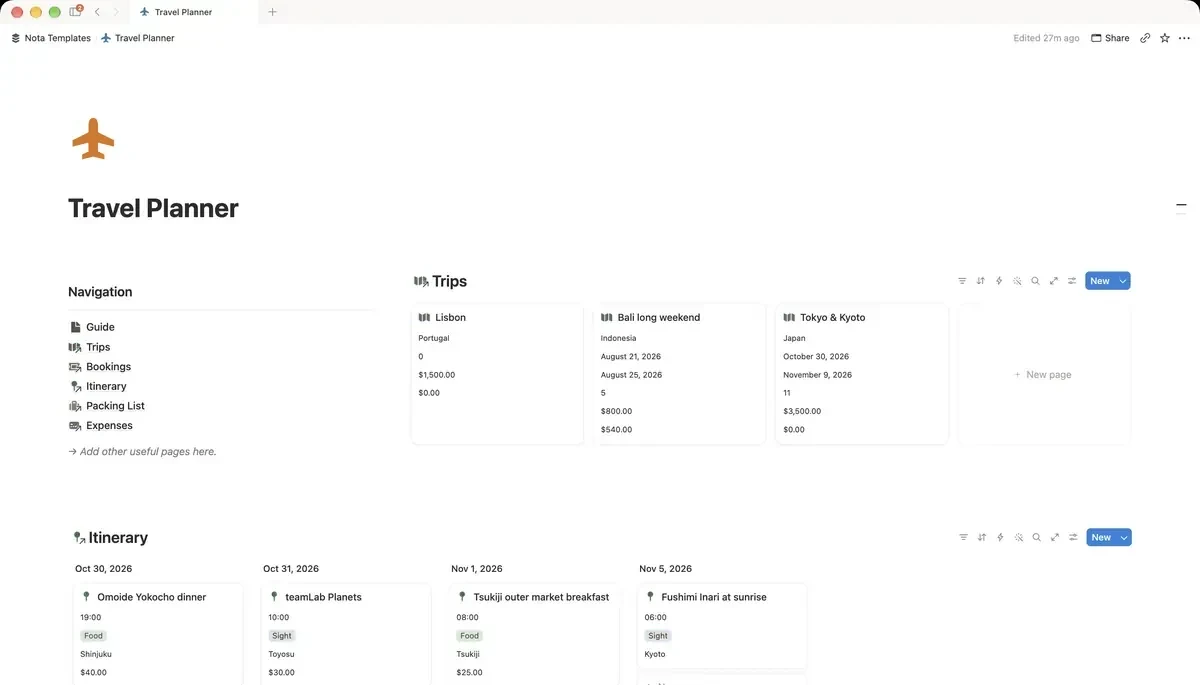
Database 1: Trips
One row per trip, and every other database points at it. Name it Trips, rename the Name column to Trip, then add Destination, Start and End dates, a Status select (Dreaming, Planning, Booked, Ongoing, Done), a Budget number and a Travelers number. Then add a Formula called Days:
if(or(empty(prop("Start")), empty(prop("End"))), 0, dateBetween(prop("End"), prop("Start"), "days") + 1)What it does: the number of days from the start to the end, counting both the first and the last day.
The +1 matters. Friday to Sunday is three days of trip, and dateBetween alone would say two.
Database 2: Bookings
Every thing with a confirmation number. Name it Bookings, rename the Name column to Booking, then add:
- Trip: a Relation pointing at Trips.
- Type: a Select: Flight, Hotel, Train, Car, Tour, Insurance.
- Date: a Date. Confirmation: Text. Paste the code, not a screenshot of it.
- Cost: a Number. Paid: a Checkbox. Link: a URL to the booking itself.
Add a view called Unpaid, filtered where Paid is unchecked. The week before departure, this is the list of things that will otherwise be charged at the desk.
Database 3: Itinerary
Name it Itinerary, rename the Name column to Activity, then add a Trip relation, a Date, a Time (Text is fine), a Type select (Sight, Food, Transport, Rest, Shopping), a Location and a Cost. Then give it two views: a Timeline by Date to see the shape of the trip, and a Board grouped by Date for the day-by-day plan you actually open each morning.
Add Rest as an activity type and schedule it. A plan with no empty afternoons is the plan you abandon by day three.
Budget against what you really spent
Add a small Expenses database with a Trip relation, a Date, an Amount and a Category. Then go back to Trips and add two Rollups: Booked cost, summing Cost from Bookings, and Spent, summing Amount from Expenses. Put Budget, Booked cost and Spent side by side on the trip's row.
Booked cost is what you committed before leaving; Spent is what happened once you got there. The second one is the number people are always surprised by.
A packing list you only write once
Make a Packing List database with Item, a Category select (Documents, Clothes, Toiletries, Tech, Health), a Packed checkbox and an Essential checkbox. Add a view called Still to pack, filtered where Packed is unchecked and grouped by Category. After the trip, untick Packed on everything, and the list is ready for the next one.
Before you leave
Open the trip's page, click the ··· menu and turn on Available offline. Your bookings and itinerary will then open on a plane or in a country where your data plan does not work, which is exactly when you will need the confirmation code.