Database 1 — Courses
Start here, because everything else hangs off it. Type /table, choose Table view, then New database, and name it Courses. Rename the Name column to Course, then add:
- Code — Text. The thing written on the timetable, not the full module title.
- Term — a Select: Autumn, Spring, Summer. This is how last year disappears without being deleted.
- Teacher — Text, and their email if you ever need it at 11pm.
Four to six rows. If you are tempted to add a row for a club or a part-time job, resist — they do not have assignments with weights, and they will distort every rollup below.
Database 2 — Assignments
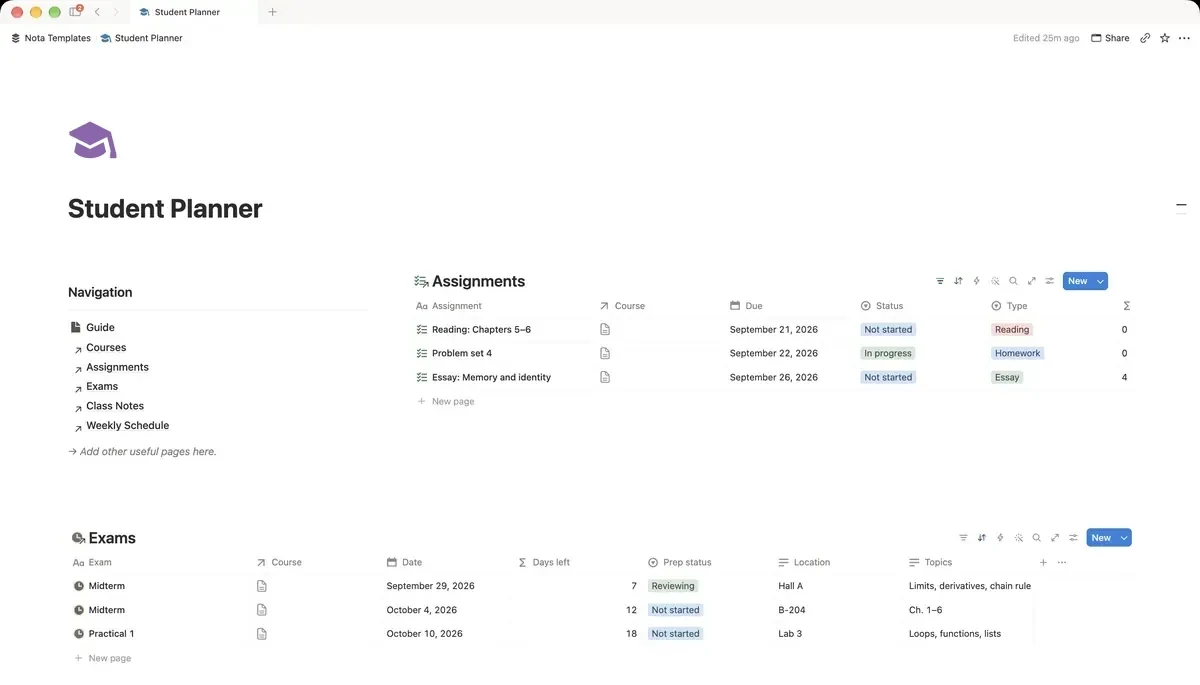
One row per thing you have to hand in. Name it Assignments, rename the Name column to Assignment, then add:
- Course — a Relation pointing at Courses.
- Due — a Date.
- Status — a Select: Not started, In progress, Submitted, Marked.
- Weight % — a Number. Copy this off the module handbook on day one, not the night before.
- Grade % — a Number, filled in after it comes back.
The formula that changes how you prioritise
Add one more property to Assignments, type Formula, and name it Worth. Paste this:
- prop("Weight %") * prop("Grade %") / 100
This is how many percentage points of the final module grade you actually banked. An 80% on something worth 5% earns you four points. A 55% on something worth 40% earns you twenty-two. Seeing those two numbers side by side is uncomfortable and useful.
Database 3 — Exams, with a countdown
Name it Exams, rename the Name column to Exam, then add a Course relation, a Date, and a Formula property called Days left with this expression:
- dateBetween(prop("Date"), now(), "days")
It recalculates itself every day. A number that goes down on its own is a different kind of pressure from a date sitting in a calendar you have to open.
The one view you will actually open
In Assignments, add a view called Due this week. Set two filters: Due is within the next week, and Status is not Marked. Sort by Weight % descending, not by date. The biggest thing due this week goes to the top, which is almost never the thing you feel like starting.
See open work per course
Back in Courses, add a Rollup: Relation set to Assignments, Property to Assignment, Calculate to Count all. Name it Open work. Add a filter on that rollup's view so only unmarked assignments count, and a glance down the Courses table tells you which module is quietly piling up.
What to skip
Do not build a timetable in Notion. Your timetable is fixed, repeats weekly, and already exists in whatever app your university uses — rebuilding it by hand is a weekend you will not get back, and it will be wrong by week three. Notion is for the things that change: what is due, what it is worth, and what you got.