About this template
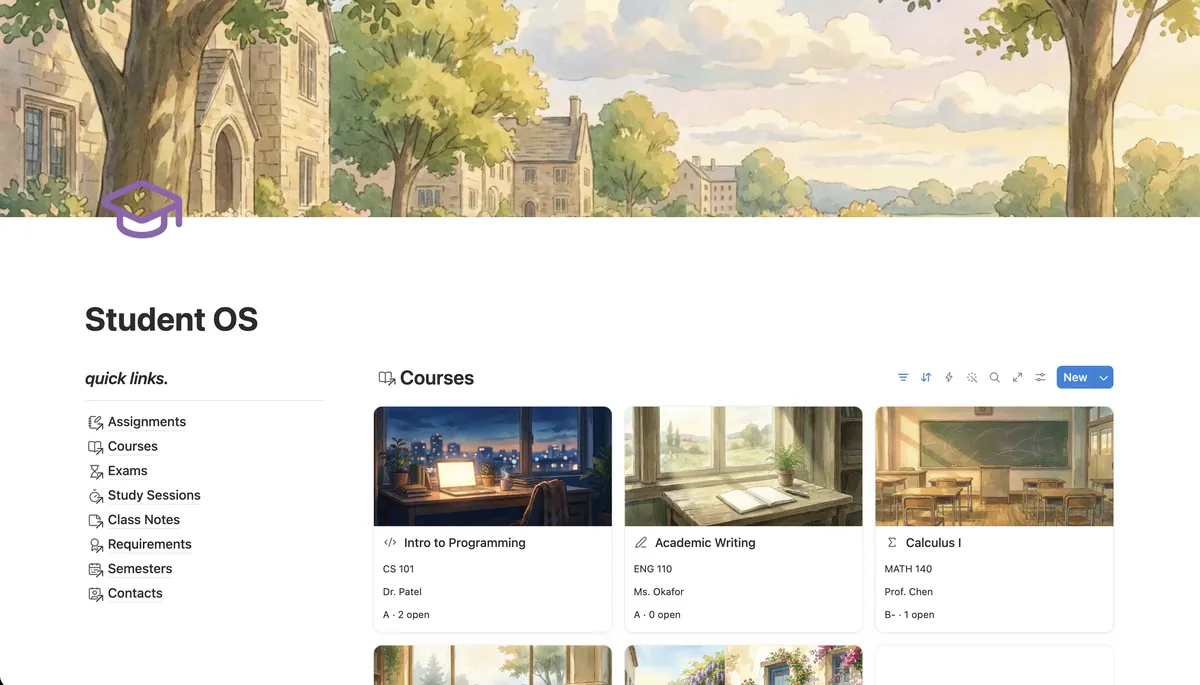
Student OS keeps a whole semester on one page: every course, every deadline, a focus timer with a study log, the grade you have so far in each course, your GPA per semester and how many credits you still need.
What's inside
- 8 linked databases for courses, work and grades
- Built-in focus timer with a study log per course
- Current grade worked out from graded work
- GPA per semester and degree progress
- Deadline board with late and due-today labels
- Exam countdown by course
How it works
- 1Complete checkout and open the link in your email.
- 2Click “Duplicate” in the top-right corner of the Notion page.
- 3The template is now in your workspace. Make it yours.
Who it's for
Student OS is for students who want more than a list of deadlines. It answers the questions that come up mid-semester: what grade do I have in this course right now, how much have I actually studied for it, and how many credits do I still need to graduate. Everything lives on one page, with your courses as picture cards, a board for what is due and a focus timer built in.
Your first week
- 1Add this semester in Semesters, then your courses with code, credits and instructor. Link each course to the degree requirement it counts towards.
- 2Copy every deadline and exam date from your syllabi. The Due label turns orange on the day and red when something is late.
- 3Study with the focus timer at the top of the page, then log the session in Study Sessions with the course and minutes.
- 4When work comes back, set it to Graded and type the grade. The course grade, letter and semester GPA update on their own.
What it doesn't do
Grades use a common US scale: A from 93, A- from 90, B+ from 87 and so on, on a 4.0 GPA scale. If your school grades differently, you edit two formulas in the Courses database once. The focus timer runs in your browser and does not log sessions by itself; you add each session with one click. There is no syncing with Canvas, Moodle or Google Classroom.
Questions
How is this different from the free Student Planner?+
The free planner tracks courses, assignments and exams. Student OS adds a focus timer and study log, works out your current grade from graded work, calculates GPA per semester, and tracks how many credits you have left for each degree requirement.
How is the current grade calculated?+
Each assignment has a weight and a grade. The course grade is the points you have earned divided by the weight that has been graded so far, so a 90 on the first 20% of the course shows as 90, not 18.
Does the focus timer work inside Notion?+
Yes. It is embedded on the page and runs there: 25-minute focus sessions, short and long breaks, and a soft chime at the end. The lengths can be changed in its settings.
Does it work on the free Notion plan?+
Yes. Everything uses relations, rollups and formulas that are available on the free plan.