About this template
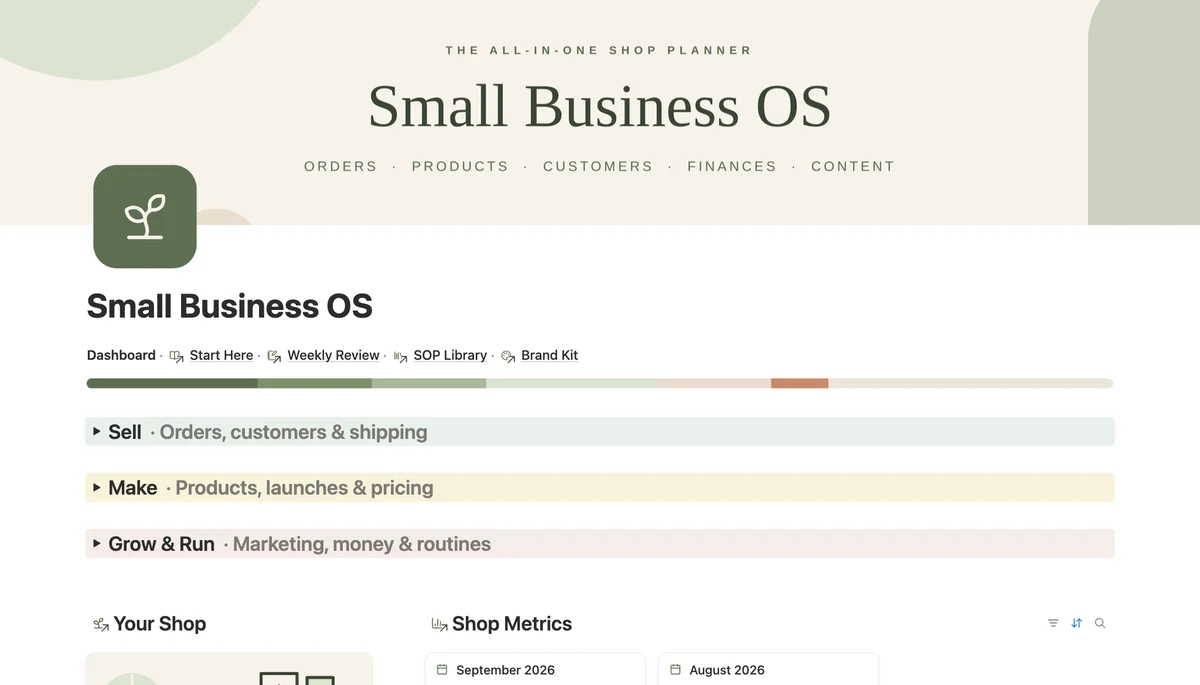
Small Business OS is one Notion workspace for running a small online shop. Orders, customers, products and stock, launches, pricing, suppliers, content and money all connect, so one dashboard shows what to ship today and how the month is going. Works on the free Notion plan.
What's inside
- 14 linked databases for a small shop
- Monthly revenue, profit and goal progress
- Stock levels with a Low Stock view
- Pricing calculator for your real margin
- Quick Links buttons for new orders and expenses
- SOP Library, Brand Kit and weekly review
How it works
- 1Complete checkout and open the link in your email.
- 2Click “Duplicate” in the top-right corner of the Notion page.
- 3The template is now in your workspace. Make it yours.
Who it's for
Small Business OS is for one-person and small shops that sell physical or digital goods on Instagram, a marketplace or their own website. Orders live in DMs, stock lives in your head and the numbers live in a spreadsheet you open once a quarter. Here every order links to a customer and to the products it used, so stock, revenue and profit add themselves up and one dashboard shows what needs you today.
Your first week
- 1Open Start Here, then fill in the Your Shop card: name, banner, story and link.
- 2Add your products with price, cost and starting stock, and set a Reorder Level so low items show up in the Low Stock view.
- 3Log every sale in Orders and link the customer and products. Use the Quick Links buttons to add an order or an expense in one click.
- 4On Friday, create one Shop Metrics card for the month, link its orders and transactions, and fill in a Weekly Review.
What it doesn't do
Nothing syncs automatically. There is no connection to Shopify, Etsy, Stripe or your bank, so orders and expenses are typed in by you or with the Quick Links buttons. It is also not accounting software: it shows revenue and profit for running the shop, not tax-ready books.
Questions
Who is it for?+
Makers and small online sellers: handmade goods, prints, candles, jewellery, digital products. The sample data is a small handmade shop, so every view shows something on day one.
Does it work on the free Notion plan?+
Yes. The dashboard, databases and buttons all work on the free plan. There are two chart views inside the source databases; Notion's free plan shows one chart per workspace, so the second one asks you to upgrade. Nothing else depends on them.
How are revenue and profit calculated?+
Each order works out its net revenue after fees and shipping. Once a month you create a Shop Metrics card and link that month's orders and transactions, and revenue, profit, order count and goal progress fill in by themselves.
Can I use my own currency?+
Yes. Change the number format on the money columns from dollars to your currency once and every total follows.